Chiropractors should request continued review for chiropractic services for certain Blue Cross Blue Shield of Massachusetts members. WholeHealth Living, Inc., a Tivity Health Company, administers the program.
Many, but not all, members in these plans need continued review for chiropractic services. Please check benefits and eligibility to determine if continued review is required.
| Plan name | Additional information |
|---|---|
| HMO/POS plans | |
| HMO Blue Blue Choice Plan 2 Network Blue |
If the member has a 12 visit limit to their chiropractic benefits, continued review doesn't apply. |
| HMO/POS New England Plans (some account exclusions apply) | |
| Access Blue New England HMO Blue New England Network Blue® New England Blue Choice® New England (POS) Blue Choice® New England Plan 2 (POS) |
Includes members who:
|
Use ConnectCenter to see if the member requires continued review.
Go to Verification>New Eligibility Inquiry and complete required fields. Click Submit.
Scroll to view the response. Under Eligibility, look for Chiropractic. If continued review is required, you'll see a message indicating continued review is required for visits 13 and beyond.
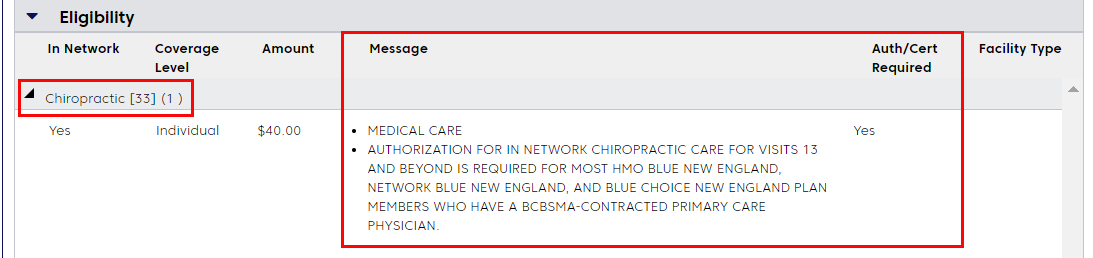
If continued review is not required, you'll see a message like the one below. This message may appear if the member has a 12 visit benefit limit for chiropractic services.

Use Availity for continued review requests for members before their 13th visit to ensure uninterrupted care and payment.
- The deadline: Submit your request within 7 days of (before or after) the member’s 13th visit.
Be prepared: Have this information ready before you log in to Availity.
| |
Member’s ID number (prefix required) and date of birth |
| |
Injury cause (auto or work-related) or details on other insurance (such as another primary insurer for coordination of benefits) |
| |
Score from the Patient-Specific Functional Scale (Leave blank if member refuses to answer questions) |
| |
All relevant diagnosis codes |
| |
Member’s medical record to answer clinical questions |
Pro tip: Use the Chrome web browser for the best experience in Availity. For group practices, request continued review at the group level.
If you receive an adverse determination, you have two paths for reconsideration through WholeHealth Living: 1) Peer-to-peer discussion; 2) Reconsideration or provider appeal.
How to start: You can request through Availity or fax a completed UM Department Request Form.
Follow this process for members with Personal Injury Protection (PIP) benefits to ensure your claims are processed correctly. This is typically used in “no-fault” auto insurance cases for those with a $2,000 PIP benefit ($8,000 for self-funded ERISA accounts).
| If the member | Then you can |
|---|---|
|
Has exhausted PIP and has not used their initial 12 Blue Cross visits for the calendar year. |
Request authorization from WholeHealth Living after the 12th visit. |
|
Has exhausted PIP and has been treated for 12 visits, but no claims have been submitted to Blue Cross. |
1. Submit the next 12 visits to Blue Cross, sequentially by date, after receiving the PIP exhaust letter. Use Blue Cross technologies to verify that claims have been received by Blue Cross. 2. Call WholeHealth Living at 1-866-656-6071 to request continued review for visit 13 and beyond as part of a PIP case. Indicate the date in which the 13th visit occurred. The WholeHealth Lliving representative will outline the process for requesting an earlier start date for a PIP case. |
Availity Practitioner Portal:
https://essentials.availity.com/static/public/onb/onboarding-ui-apps/availity-fr-ui/#/login
 WholeHealth Living Utilization Management Authorization Submission Manual
 Patient-specific Functional Scales
To download the Chiropractic payment policy, log in and click Find a Payment Policy on the right side of your home page. Or, go to Office Resources>Policies & Guidelines>Payment Policies.
- For help with Availity: Call Availity Practitioner Support at 1-800-282-4548
- For questions about your review request: Call WholeHealth Living at 1-866-656-6071